
Viewing Conversions
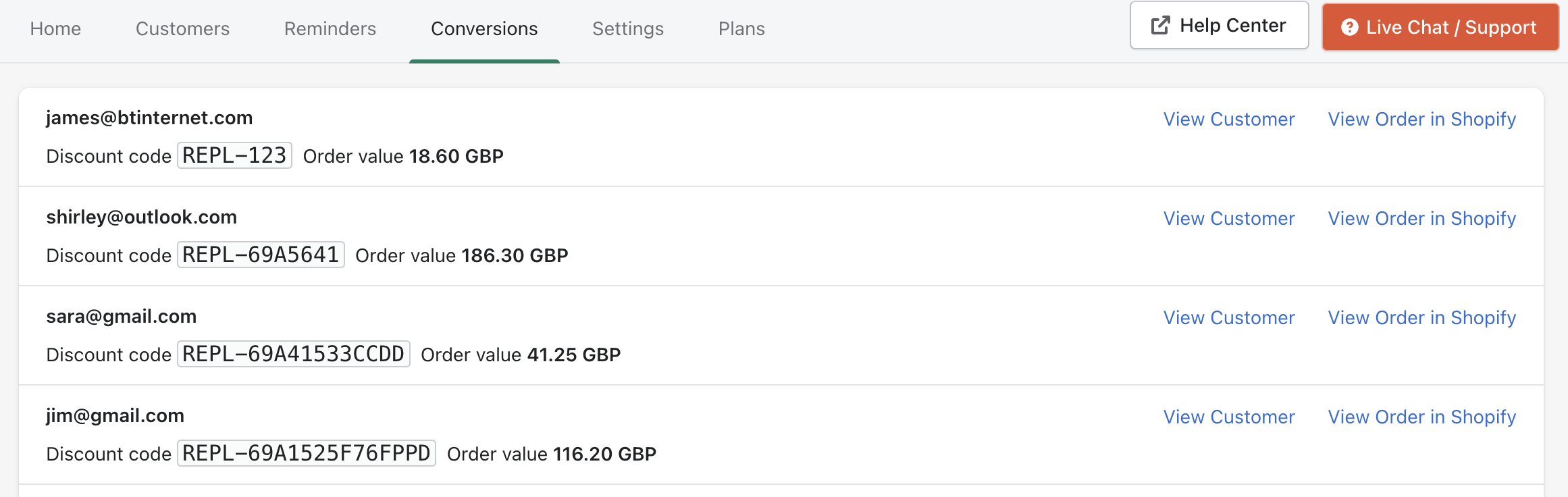
The Conversions page shows orders that were generated from Replenish reminder emails.
This allows you to track the customers who returned to purchase after receiving a reminder and measure the revenue generated by your replenishment campaign.
Viewing conversions
Open the Conversions tab in the Replenish app to see a list of all orders attributed to Replenish.
Each entry shows:
The customer who placed the order
The discount code used in the replenishment email
The value of the order
This provides a clear overview of the revenue generated by your replenishment reminders.
Viewing customer and order details
From the conversions list you can access additional details.
View Customer
Opens the customer's profile within Replenish so you can review their reminders and activity.
View Order in Shopify
Opens the order directly in Shopify so you can review the order details within your store admin.
Need help?
If you need any help setting up Replenish, have questions about how it works, or would like a demo, we're here to help.
Email us at [email protected] and we'll get back to you as soon as possible.